

Estimated reading time: 22 minutes
GitHub Copilot’s Plan agent, introduced in Visual Studio in May 2026, adds a deliberate planning phase before any code generation happens. Instead of watching AI modify files in unpredictable directions, you review and approve a detailed Markdown plan grounded in your actual codebase — before a single file changes. This guide covers how the Plan agent works step by step, how to write prompts that produce genuinely useful plans, and how to apply it to a real Dataverse plugin refactoring scenario with working before-and-after code examples.
Table of contents
We’ve all been there. You fire up GitHub Copilot in Agent mode, describe a feature, and watch it start modifying files across your solution. Ten minutes later you’re staring at a cascade of changes that technically compile — but head in entirely the wrong direction. The AI wasn’t wrong. You just weren’t aligned with it before it started.
This isn’t a criticism of agentic AI — it’s a structural limitation of how it has worked up to now. Agent mode is optimised for doing. The moment you describe a task, the model starts gathering context and generating changes. For small, well-bounded tasks that’s exactly the right behaviour. For anything larger — a multi-file refactor, a new integration layer, a significant architecture change — the absence of an explicit alignment step is where things go sideways.
Microsoft introduced the Plan agent in Visual Studio in May 2026 — a dedicated GitHub Copilot agent that puts a deliberate planning phase before any code generation happens. It scans your codebase in read-only mode, asks targeted clarifying questions, and produces a detailed step-by-step Markdown plan that you can review, edit, and approve before a single file is touched. Only after you explicitly trigger implementation does the agent mode take over and execute the plan.
For those of us building complex enterprise solutions on Power Platform, Dynamics 365, or .NET backends, this is a meaningful shift. Not because it makes the AI smarter — the underlying model is the same — but because it makes the collaboration smarter. You’re not reviewing a diff after the fact and trying to reverse decisions you didn’t make. You’re reviewing a plan before the decisions are executed, while the cost of changing your mind is still zero.
Think of it as the difference between an architect showing you blueprints versus a contractor arriving with half the walls already framed. The end result might be technically sound either way. But one of those conversations is much easier to have.
What You Will Find in This Article
In this article I’ll walk through exactly how the Plan agent works — the five-phase workflow, what a real plan output looks like, how to write prompts that produce genuinely useful plans, and a complete before-and-after example from a Dataverse plugin refactoring scenario. If you’ve been using GitHub Copilot Agent mode and occasionally found yourself cleaning up after it, this feature is directly aimed at the problem you’ve been experiencing.

The Problem With “Just Build It”
Agent mode has been a game-changer, but it has an inherent tension: the moment you describe something to Copilot, it wants to build it. That eagerness is great for small, well-scoped tasks. For larger features — refactoring a module, wiring up a new integration, redesigning a service layer — jumping straight to implementation is risky.
Consider this pattern that many of us have experienced:
You:     "Add retry logic to all Dataverse API calls in the service layer."
Copilot: [modifies 12 files, introduces Polly, changes interface signatures,
          updates DI registration, adds new config keys...]
You:     "Wait — we already use a custom HttpClient factory with retry built in.
          I just needed it applied to the OrganizationServiceProxy calls."
The AI wasn’t wrong about how to add retry logic. It was wrong about where you needed it, because neither of you paused to agree on scope before acting.
The Plan agent inserts a structured plan-first loop that makes this kind of misalignment visible before a single file is touched.

How the Plan Agent Works: Step by Step
The Plan agent is a distinct mode inside GitHub Copilot — not an extension, not a plugin, not a separate tool. It ships as a first-class option in the agent picker alongside Ask, Edit, and Agent mode. You select it, describe your task, and the planning loop begins.
The workflow lives inside the Copilot Chat panel. From the agent picker, you select Plan instead of Agent, then describe your task. Here’s what happens next.
The five phases are sequential and non-negotiable in order — Copilot won’t start drafting until it has finished scanning, and it won’t implement until you explicitly trigger it. That sequencing is the point. Each phase is designed to surface information and decisions at the moment they’re cheapest to change.
One thing worth noting before diving in: the Plan agent uses the same underlying model as Agent mode. It doesn’t produce better code because it’s smarter — it produces better outcomes because the process is smarter. The planning loop forces alignment that would otherwise happen (or not happen) during implementation.

Phase 1 — Describe Your Intent
Your prompt is the starting point. The Plan agent handles both vague and precise requests, but the specificity of your prompt affects how many clarifying questions it asks — and how accurate the resulting plan is.
Think of this phase as writing a brief for a consultant who is about to read your entire codebase. You don’t need to tell them everything — they’ll discover the details in Phase 2. But you do need to tell them:
- What you want to achieve — the goal, not just the action
- Which part of the system is in scope — project, layer, class, or feature boundary
- What constraints apply — what must not change, what patterns to follow, what libraries are off-limits
- What the expected output looks like — including whether tests are expected
The more of these you provide upfront, the fewer clarifying rounds are needed before the plan is drafted.
Vague prompt (expect more questions):
Precise prompt (faster to draft):
For complex enterprise work, a precise prompt is almost always worth the extra 30 seconds to write. It dramatically reduces the number of clarifying rounds.
One practical tip: if you find yourself frequently editing the same types of things in the plan output, that’s a signal the missing information belongs in the prompt. Work backwards from what keeps changing in the plan and add it as an explicit constraint next time.

Phase 2 — Copilot Scans Your Codebase (Read-Only)
Before asking anything, Copilot reads your solution using read-only tools only — no writes, no changes. It looks at:
- Project structure and solution layout
- Existing service registrations and DI configuration
- Interface definitions and existing implementations
- Relevant configuration files (e.g.,
appsettings.json,*.csproj) - NuGet package references
This is important: the plan it produces will be grounded in your codebase, not a generic template. For Power Platform developers working with PAC CLI projects, plugin assemblies, or multi-solution repositories, this means Copilot will understand your actual project layout before it proposes anything.
This phase is also where the Plan agent earns its value over a generic AI assistant. A tool that doesn’t read your code can only give you a plan based on what you described. The Plan agent gives you a plan based on what actually exists — which often turns out to be different in ways that matter.
After scanning, it asks clarifying questions where it finds ambiguity:
Copilot: I found two projects that expose API endpoints:
         - CustomerPortal.Api
         - InternalAdmin.Api

         Should JWT validation apply to both, or only CustomerPortal.Api?

         I also see that InternalAdmin.Api uses Windows Authentication.
         Do you want to leave that unchanged?
Answer these questions directly in chat. Each answer narrows the scope of the plan.
Don’t skip past the clarifying questions quickly. These are the moments where misalignment is cheapest to fix. A one-sentence answer here can save you from removing three steps from the plan later — or from undoing an entire implementation after the fact.

Phase 3 — The Plan Is Drafted
Once Copilot has enough context, it generates a detailed step-by-step implementation plan. Here’s an example of what a real plan looks like for a Dataverse plugin scenario.
Prompt given:
Example plan output (saved to .copilot/plans/plan-accountsync-refactor.md):
## Goal
Extract business logic from AccountSyncPlugin.Execute() into a
testable AccountSyncService class, introducing a factory interface
for dependency injection in unit tests.

## Affected Files
- src/Plugins/AccountSyncPlugin.cs (modify)
- src/Services/AccountSyncService.cs (create)
- src/Services/IAccountSyncService.cs (create)
- src/Factories/IOrganizationServiceFactory.cs (create)
- src/Factories/OrganizationServiceFactory.cs (create)
- tests/Plugins/AccountSyncPluginTests.cs (create)
- tests/Services/AccountSyncServiceTests.cs (create)
Step 1 — Create IOrganizationServiceFactory
Define an interface that wraps IOrganizationService creation so unit tests can inject a mock:
public interface IOrganizationServiceFactory
{
    IOrganizationService CreateOrganizationService(Guid userId);
}Step 2 — Create IAccountSyncService
Define the service interface exposing the sync operation:
public interface IAccountSyncService
{
    void SyncAccount(Entity account, IOrganizationService service);
}Step 3 — Implement AccountSyncService
Move all business logic from AccountSyncPlugin.Execute() into AccountSyncService.SyncAccount(). The plugin becomes a thin orchestrator.
Step 4 — Refactor AccountSyncPlugin
Replace inline logic with a call to IAccountSyncService. Use a factory constructor for production and a testable constructor for unit tests (poor man’s DI, standard plugin pattern).
Step 5 — Write Unit Tests
Create AccountSyncServiceTests using Moq to mock IOrganizationService. Verify sync logic without Dataverse dependency.
Out of Scope
- IPlugin registration in plugin registration tool
- Changes to other plugins in the solution
- Shared service locator infrastructure
Open Questions
- Should AccountSyncService be registered in a shared ServiceLocator, or remain self-contained per plugin?
This is a plan you can actually review in a pull request. You can push back on individual steps, ask Copilot to break “Step 3” into sub-steps, or ask it to reconsider the factory pattern if your team uses a different approach.
Let’s walk through each step and what it actually means in practice:
Step 1 — Create IOrganizationServiceFactory This is the foundational abstraction that makes the entire refactor testable. Dataverse plugins run in a sandbox where you can’t inject dependencies through a DI container in the traditional sense. The factory interface is the seam — in production, the real factory calls serviceFactory.CreateOrganizationService(context.UserId) as it always has. In tests, you swap in a mock. The Plan agent correctly identifies this as the first step because everything else depends on it.
Step 2 — Create IAccountSyncService Defining the interface before the implementation is a deliberate design discipline. It forces you to think about the surface area of the service — what operations it exposes, what parameters they take, what they return — without getting distracted by implementation details. It also makes the contract reviewable: a colleague can read two lines of interface and tell you whether the design makes sense, without reading 200 lines of business logic.
Step 3 — Implement AccountSyncService This is the largest step and the one most likely to need sub-steps in a real project. The plan intentionally describes it at a high level — “move all business logic” — rather than detailing every method, because Copilot will discover the specifics during implementation by reading the existing Execute method. If you know specific methods should be broken out separately (e.g., ValidateExternalId vs UpdateRelatedContacts), this is the step where you’d add those constraints as inline comments before triggering implementation.
Step 4 — Refactor AccountSyncPlugin The “poor man’s DI” pattern is worth understanding explicitly. Dataverse plugins require a parameterless constructor — the runtime calls new AccountSyncPlugin() with no arguments. The pattern adds a second internal constructor that accepts the service interface, used only by unit tests. Production code takes the real path; tests take the injectable path. The Plan agent surfaces this pattern because it’s the standard Dataverse approach, not because it’s the ideal DI pattern in general. If you have a different convention in your team’s plugin base, this is the step to edit.
Step 5 — Write Unit Tests Unit tests appearing as the last step, not the first, reflects implementation pragmatism — you can’t write meaningful tests against an interface that doesn’t exist yet. But note that the plan includes them at all only because the original prompt specified “create unit tests using Moq”. Without that instruction, this step would likely have been omitted. This is a concrete example of why stating test expectations in the prompt matters.
Notice the structure of the plan: it separates what is in scope from what is explicitly out of scope, and it surfaces open questions rather than silently making assumptions. These three elements — scope, exclusions, and open questions — are where most implementation surprises come from when you skip the planning phase. The plan makes them visible before any code is written.
If the first draft doesn’t look right, you can ask Copilot to revise it in chat before moving on. “Add a step for integration test scaffolding” or “Remove the ServiceLocator registration — we handle that separately” are both valid refinements at this stage. The plan is a conversation, not a contract.

Phase 4 — You Edit the Plan Directly
Every plan is persisted as a Markdown file at:
.copilot/
  plans/
    plan-accountsync-refactor.md
    plan-jwt-auth-middleware.md
This means you can:
Edit in the editor — Open the file and modify it like any other Markdown document. Add or remove steps, change file paths, add notes. Copilot reads your edits and keeps the chat context in sync.
Commit to version control — Add the plan to your PR as documentation of the design decision. Future developers (including you, six months from now) can see why the code is structured the way it is.
Share for team review — Send the plan to a colleague or architect before implementation begins. Getting sign-off on a Markdown plan is much faster than reviewing a 15-file diff.
Add constraints as comments:
### Step 3 — Implement AccountSyncService
<!-- CONSTRAINT: Do not use static members. Plugin assembly is shared. -->
<!-- CONSTRAINT: Keep sync logic synchronous — no async/await in plugins. -->
Move all business logic from AccountSyncPlugin.Execute() into
AccountSyncService.SyncAccount().
Copilot will respect these inline comments when it implements.
This phase is where the Plan agent most clearly separates itself from the standard Agent mode workflow. You’re not watching code appear and hoping it matches your mental model. You’re editing a document that describes what will happen, in plain English, before a single line of code is generated. The cognitive load of catching a mistake in a Markdown plan is an order of magnitude lower than catching it in a 15-file diff.
There’s also a team dimension worth considering. Architects and senior developers who don’t write code every day can review a plan meaningfully — they don’t need to read C# to have an opinion on whether the proposed service boundary makes sense. The plan file is a communication artefact, not just a Copilot input.

Phase 5 — Implement
When you’re satisfied, click Implement plan. Agent mode takes over, works through the plan step by step, creates and modifies files, and shows you progress in real time.
The key difference from running Agent mode directly: you approved the plan first. The implementation phase is executing a decision you already made, not discovering the decision mid-flight.
During implementation you can still intervene. If a step produces output you disagree with, you can pause, edit the plan, and continue — or ask Copilot to redo a specific step with additional guidance. The plan file remains editable throughout. This is different from trying to mid-course-correct in standard Agent mode, where the model has already built up a chain of decisions that are harder to unwind.
When implementation completes, the plan file stays in .copilot/plans/. It doesn’t get deleted or archived automatically. That’s intentional — it becomes the record of what was decided and why, which feeds directly into Phase 4’s value as a living document (covered later in this article).

Writing Better Prompts for the Plan Agent
Not all prompts produce equally useful plans. The underlying model is the same regardless of how you phrase the task — what changes is how much useful context the model has to work with, and how well-bounded the scope is when it starts scanning.
The patterns below aren’t rules. They’re observations from working with the Plan agent on real enterprise projects. Each one addresses a common failure mode: plans that are too broad, plans that ignore existing conventions, plans that skip tests, and plans that accidentally touch things they shouldn’t.
Pattern 1 — Scope by Layer, Not by Feature
“Add caching” means something very different depending on whether it applies to the data access layer, the service layer, an API response cache, or a CDN rule. A feature-level description forces the Plan agent to make a decision about scope that you should be making explicitly.
Instead of:
Try:
The second prompt defines the layer (AccountRepository), the mechanism (IMemoryCache), the behaviour (5-minute sliding expiration), and the boundary (stop at the repository — don’t touch anything above it). The Plan agent can produce a plan with four or five concrete steps from the second prompt. From the first, it will ask questions that you should have answered in the prompt.
A useful heuristic: if your prompt contains the word “the app” or “everywhere”, it almost certainly needs to be narrowed.
Pattern 2 — Reference Existing Patterns
The Plan agent reads your codebase before drafting. This means you can use your existing code as a specification.
Instead of describing how you want something built from first principles, point to a class or pattern that already works the way you want:
Copilot will scan OrderService and OrderRepository before drafting — your existing code becomes the template. The plan will reference the actual class names, method signatures, and structural decisions already present in your codebase rather than inventing a generic approach.
This is particularly valuable in large enterprise codebases where consistency matters. Telling Copilot “follow the pattern in X” produces plans that fit your existing conventions. Telling it “use a repository pattern” produces plans that fit a textbook definition of a repository pattern, which may or may not match what your team uses.
You can also use this to reference error handling conventions, logging patterns, response structures, or test naming conventions — anything that already exists in your codebase and represents the standard you want maintained.
Pattern 3 — Specify Test Coverage Expectations
Tests are one of the most commonly omitted elements from AI-generated plans, and almost always for the same reason: the prompt didn’t mention them.
This isn’t a bug — it’s a reasonable default. If you ask for a feature and don’t mention tests, the plan focuses on the feature. If you want tests in the plan, say so explicitly:
Specifying tests in the prompt does three things. First, it puts tests into the plan as named steps — not as a vague “add tests” note, but as specific test classes in specific files. Second, it influences the design: if the plan needs to include testable code, Copilot is more likely to propose the right abstractions (interfaces, factory injection, constructor overloads) rather than a simpler but harder-to-test structure. Third, it gives you something concrete to review in the plan — you can see whether the proposed test coverage matches your expectations before implementation begins.
If your team has a minimum coverage expectation or specific test categories that should always be included (unit, integration, edge cases), state them in the prompt.
Pattern 4 — Use Constraints to Protect Sensitive Areas
Multi-developer codebases always have code that shouldn’t be touched right now — a class being refactored in a parallel branch, a controller under active review, a config file managed by infrastructure. The Plan agent has no way to know about these unless you tell it.
Constraints are the most direct way to communicate boundaries:
Without the constraint, the Plan agent might reasonably include WebhookController in the affected files list — it’s part of the pipeline, after all. With the constraint, the plan explicitly excludes it and scopes the work to the two classes you specified.
You can also add constraints directly to the plan file as inline comments after it’s been drafted (as shown in Phase 4). But there’s a difference between adding a constraint to a plan that’s already been drafted versus putting it in the initial prompt: the prompt-level constraint shapes which files get scanned and considered; the inline comment constrains how an already-identified step gets implemented. Both are useful — they work at different points in the process.
A broader principle: anything that would cause you to push back during plan review is worth including in the prompt upfront. The sooner in the process you communicate a constraint, the less work gets done based on wrong assumptions.
Pattern 5 — Describe the End State, Not Just the Action
Plans drafted from action-oriented prompts (“add X”, “refactor Y”, “create Z”) tend to focus on the mechanics of the change. Plans drafted from outcome-oriented prompts tend to include the reasoning and surface better questions.
Compare:
Action-oriented:
Outcome-oriented:
The second prompt produces a plan that reflects an understanding of why retry logic is being added, not just what is being added. The “Out of Scope” section will be more specific. The steps will be better ordered. The open questions will surface the decisions you actually need to make — like whether to centralise the Polly policy in a shared factory or configure it per call site.
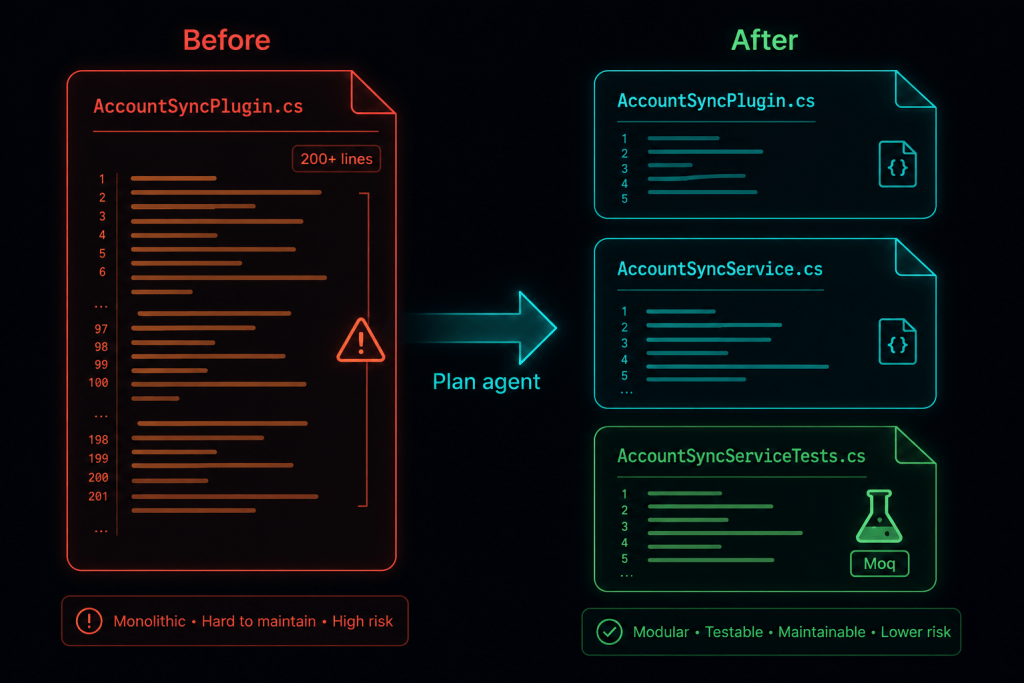
A Real-World Scenario: Power Platform Plugin Refactor
Let me walk through a scenario relevant to most readers here — refactoring a Dataverse plugin for testability.
Starting point: A monolithic plugin that does too much.
// Before: AccountSyncPlugin.cs — hard to test, business logic mixed with plumbing
public class AccountSyncPlugin : IPlugin
{
    public void Execute(IServiceProvider serviceProvider)
    {
        var context = (IPluginExecutionContext)
            serviceProvider.GetService(typeof(IPluginExecutionContext));
        var serviceFactory = (IOrganizationServiceFactory)
            serviceProvider.GetService(typeof(IOrganizationServiceFactory));
        var service = serviceFactory.CreateOrganizationService(context.UserId);

        // 200 lines of business logic directly here
        var target = (Entity)context.InputParameters["Target"];
        var existingAccount = service.Retrieve("account",
            target.GetAttributeValue<Guid>("accountid"),
            new ColumnSet("name", "emailaddress1", "externalid"));

        // sync logic, validation, related record updates...
        // all tangled together with no way to unit test
    }
}Prompt to the Plan agent:
After implementation — the refactored plugin:
// After: AccountSyncPlugin.cs — thin orchestrator
public class AccountSyncPlugin : IPlugin
{
    private readonly IAccountSyncService _syncService;

    // Production constructor — called by Dataverse runtime
    public AccountSyncPlugin()
    {
        _syncService = new AccountSyncService(
            new DataverseOrganizationServiceFactory());
    }

    // Testable constructor — called by unit tests
    internal AccountSyncPlugin(IAccountSyncService syncService)
    {
        _syncService = syncService;
    }

    public void Execute(IServiceProvider serviceProvider)
    {
        var context = (IPluginExecutionContext)
            serviceProvider.GetService(typeof(IPluginExecutionContext));
        var serviceFactory = (IOrganizationServiceFactory)
            serviceProvider.GetService(typeof(IOrganizationServiceFactory));
        var service = serviceFactory.CreateOrganizationService(context.UserId);

        var target = (Entity)context.InputParameters["Target"];
        _syncService.SyncAccount(target, service);
    }
}// After: AccountSyncService.cs — all business logic, fully testable
public class AccountSyncService : IAccountSyncService
{
private readonly IDataverseOrganizationServiceFactory _factory;
public AccountSyncService(IDataverseOrganizationServiceFactory factory)
{
_factory = factory;
}
public void SyncAccount(Entity target, IOrganizationService service)
{
var accountId = target.GetAttributeValue<Guid>("accountid");
var existing = service.Retrieve("account", accountId,
new ColumnSet("name", "emailaddress1", "externalid"));
ValidateExternalId(target, existing);
UpdateRelatedContacts(target, service);
ApplySyncStatus(target, service);
}
private void ValidateExternalId(Entity target, Entity existing) { /* ... */ }
private void UpdateRelatedContacts(Entity target, IOrganizationService svc) { /* ... */ }
private void ApplySyncStatus(Entity target, IOrganizationService svc) { /* ... */ }
}// After: AccountSyncServiceTests.cs — no live Dataverse needed
[TestClass]
public class AccountSyncServiceTests
{
private Mock<IOrganizationService> _mockService;
private Mock<IDataverseOrganizationServiceFactory> _mockFactory;
private AccountSyncService _sut;
[TestInitialize]
public void Setup()
{
_mockService = new Mock<IOrganizationService>();
_mockFactory = new Mock<IDataverseOrganizationServiceFactory>();
_sut = new AccountSyncService(_mockFactory.Object);
}
[TestMethod]
public void SyncAccount_WithValidExternalId_UpdatesRelatedContacts()
{
// Arrange
var accountId = Guid.NewGuid();
var target = new Entity("account") { Id = accountId };
target["externalid"] = "EXT-001";
var existing = new Entity("account") { Id = accountId };
existing["externalid"] = "EXT-001";
existing["name"] = "Contoso Ltd";
_mockService
.Setup(s => s.Retrieve("account", accountId, It.IsAny<ColumnSet>()))
.Returns(existing);
// Act
_sut.SyncAccount(target, _mockService.Object);
// Assert
_mockService.Verify(
s => s.Update(It.Is<Entity>(e => e.LogicalName == "contact")),
Times.AtLeastOnce);
}
[TestMethod]
[ExpectedException(typeof(InvalidPluginExecutionException))]
public void SyncAccount_WithMismatchedExternalId_ThrowsException()
{
var accountId = Guid.NewGuid();
var target = new Entity("account") { Id = accountId };
target["externalid"] = "EXT-002"; // different
var existing = new Entity("account") { Id = accountId };
existing["externalid"] = "EXT-001"; // original
_mockService
.Setup(s => s.Retrieve("account", accountId, It.IsAny<ColumnSet>()))
.Returns(existing);
_sut.SyncAccount(target, _mockService.Object);
}
}The plan agent produced the structure. The implementation agent filled in the code. You reviewed and approved a Markdown plan before any of this landed in your solution.

The Plan File as a Living Document
One underappreciated aspect of the Plan agent is what happens to the .copilot/plans/ folder over time. Consider a team convention:
.copilot/
  plans/
    plan-accountsync-refactor.md       ← completed, committed
    plan-jwt-auth-middleware.md        ← completed, committed
    plan-bulk-import-pipeline.md       ← in progress
    plan-power-pages-auth-redesign.md  ← under review
These files become a lightweight decision log for your codebase. Add a frontmatter convention and they’re even more useful:
---
status: completed
implemented: 2026-06-01
author: zsolt
pr: #142
---

# Plan: AccountSync Plugin Refactor
...
This is something your team can standardize without any tooling overhead — it’s just Markdown in a committed folder.

Where This Fits in Your Development Loop
The Plan agent lives at the design end of the development pipeline. Here’s how it relates to the other stages:
[Plan agent]           ← design & scope alignment
     ↓
[Agent mode / Copilot] ← implementation
     ↓
[Solution Checker]     ← static analysis (Power Platform)
[Unit Tests / CI]      ← automated verification
     ↓
[PR Review]            ← human review of diffs
     ↓
[ALM pipeline / PAC CLI deploy] ← promotion to environment
It’s not a replacement for any of the downstream checks. A plan won’t catch a runtime bug or a missing managed property. But it dramatically increases the likelihood that what gets built is what was intended — which reduces the cost of everything downstream.
Summary
The Plan agent is a practical addition to the GitHub Copilot toolset that addresses a real gap in agentic workflows: the absence of a structured design phase before implementation begins.
For enterprise developers, the benefits are concrete:
- Plans are editable Markdown — you stay in control of the design, not just the code review
- Read-only codebase scanning — plans are grounded in your actual solution structure
- No code changes until you approve — the planning and implementation phases are explicitly separated
- Plans persist in version control — your
.copilot/plans/folder becomes a lightweight decision log
Try it on your next refactoring task. Write a precise prompt, let Copilot scan, push back on the first draft, edit the Markdown directly, then implement. The extra five minutes at the planning stage will save you a much longer cleanup later.
References
Primary / Official Sources
1. Visual Studio Blog (devblogs.microsoft.com) — dedicated announcement 🔗 https://devblogs.microsoft.com/visualstudio/plan-before-you-build-introducing-the-plan-agent-in-visual-studio/ The dedicated announcement post explains how the Plan agent starts with a deeper understanding of what you’re building — asking questions, clarifying intent, and letting you iterate on the plan before making a single change. It also notes this was shaped by user feedback requesting more control over when planning happens, the ability to edit plans directly, and a way to save and share them. Microsoft
2. Visual Studio Blog (devblogs.microsoft.com) — May update roundup 🔗 https://devblogs.microsoft.com/visualstudio/visual-studio-may-update-plan-review-refine/ The May update post describes every plan being saved as a Markdown file at .copilot/plans/plan-{title}.md, serving as a single source of truth that can be edited directly, refined through chat, or shared with the team. When ready, clicking “Implement plan” hands it off to Agent mode for execution. Microsoft
3. GitHub Changelog — May update 🔗 https://github.blog/changelog/2026-06-04-github-copilot-in-visual-studio-may-update/ The GitHub Changelog entry confirms the Plan agent is labeled “Plan” in the agent picker, lets you collaborate with Copilot on an implementation plan before any code is written, explores the codebase with read-only tools, asks clarifying questions, and drafts a detailed plan saved as a Markdown file at .copilot/plans/plan-{title}.md. GitHub
4. Microsoft Learn — Official Plan agent documentation 🔗 https://learn.microsoft.com/en-us/visualstudio/ide/copilot-plan-agent?view=visualstudio The official docs page confirms that unlike Agent mode, the Plan agent doesn’t edit files or run implementation steps while planning. It’s particularly useful for big features (breaking down complex work into clear, reviewable steps) and unfamiliar codebases (letting Copilot inspect the solution and explain likely touch points before it edits anything). Microsoft Learn
5. Visual Studio 2026 Release Notes — Microsoft Learn 🔗 https://learn.microsoft.com/en-us/visualstudio/releases/2026/release-notes The official release notes reference the May 12, 2026 release and include the Skills panel feature that ships alongside the Plan agent — a dedicated panel listing every skill discovered from the workspace and user profile. Microsoft Learn
6. Microsoft Learn — Get Started with GitHub Copilot in Visual Studio 🔗 https://learn.microsoft.com/en-us/visualstudio/ide/visual-studio-github-copilot-get-started?view=visualstudio The getting started guide now references the Plan agent as a first-class workflow step: use the agent picker to select Plan, create an implementation plan before making code changes, and Copilot saves the plan as Markdown in .copilot/plans/. Microsoft Learn
7. Visual Studio Magazine (third-party coverage) 🔗 https://visualstudiomagazine.com/articles/2026/05/26/visual-studio-may-update-adds-plan-agent-diff-review-tools.aspx Not an official Microsoft source, but a widely-cited trade publication covering the May update with additional context on the MSVC Build Tools and diff review tooling shipped in the same release.